Live2D新错误及修正
最后更新时间:
文章总字数:
预计阅读时间:
摘要
本文是在今天发现博客首页的Live2D再次出现故障并修复的过程记录。
新的故障
今天在准备进行更换博客的主题时,发现左下角的Live2D再次不能正常使用
打开浏览器控制台:
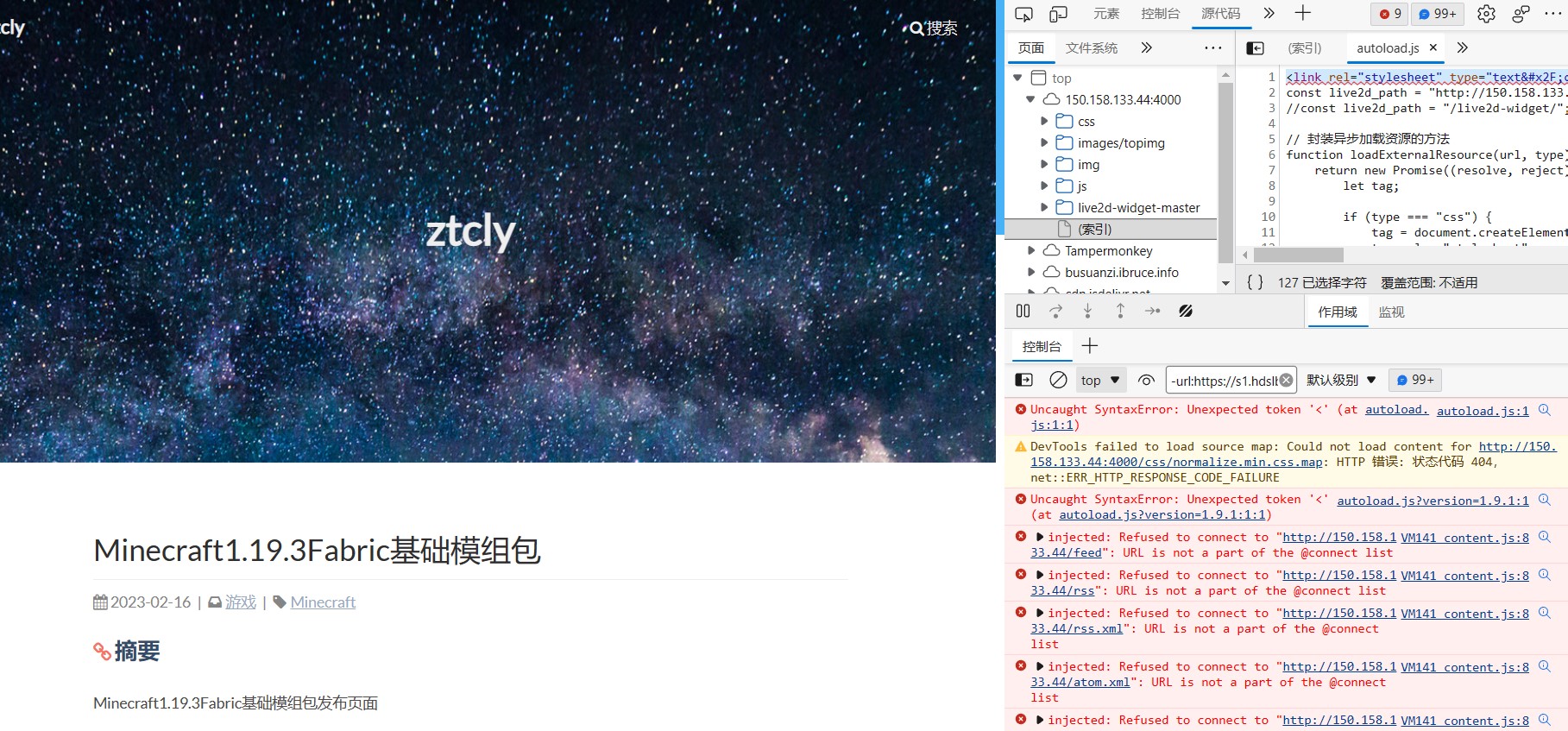
这次的报错是之前经历过的问题Uncaught SyntaxError: Unexpected token '<'。但是由于之前已经将Api的目录模式关掉,故应当是传了别的东西过来。
仔细检查报错的Autoload.js,首行明显出现一行画风不会的html。
1 | |
这一句已经清清楚楚的将故障的来源表明清楚:这次的故障可能是Hexo-tag-hint这个插件所引发的。
Hint
hexo-tag-hint这个插件的作用在这句话中就能显示,点一下这句带着下划线的话就能看见。
这句代码出现在这里,说明这个插件会向每个页面插入以让每个页面加载它所提供的css。但是很明显Live2d插件所使用的这些js文件不应在此列。
使用VSCode的文件查询功能,在hint插件范围内查找插入这句html的代码。
可以找到如下内容:
1 | |
这里是一个Hexo的过滤器,我们可以查看Hexo的文档
对于过滤器的声明给出的示例格式如下:
1 | |
考虑插件中给出的Filter,查看文档给出的示例:
after_post_render
Executed after a post is rendered. Refer to post rendering to learn the execution steps.
For example, to replace @username with a link to a Twitter profile:
1 | |
博客在生成时,会对文章进行渲染。而after_post_render过滤器则会在博文渲染完毕后触发。向其中插入html。
接下来就是让js文件避免被进行渲染。
Hexo文件处理
根据文档,Hexo对于source文件夹下的文件处理:
Sourcefolder. This is where you put your site’s content. Hexo ignores hidden files and files or folders whose names are prefixed with_(underscore) - except the_postsfolder. Renderable files (e.g.Markdown,HTML) will be processed and put into thepublicfolder, while other files will simply be copied.
接下来只需要让hexo在每次生成时将js文件原封不动的搬过去。
参见文档的这一部分
Paths that will be copied to public raw, without being rendered. You can use glob expressions for path matching.
Examples:
1 | |
_找到配置文件_config.yml,并添加:
1 | |
2024/08/09更新:
修改_config.yml需要执行hexo clean再重新生成静态文件